 En
En Fr
Fr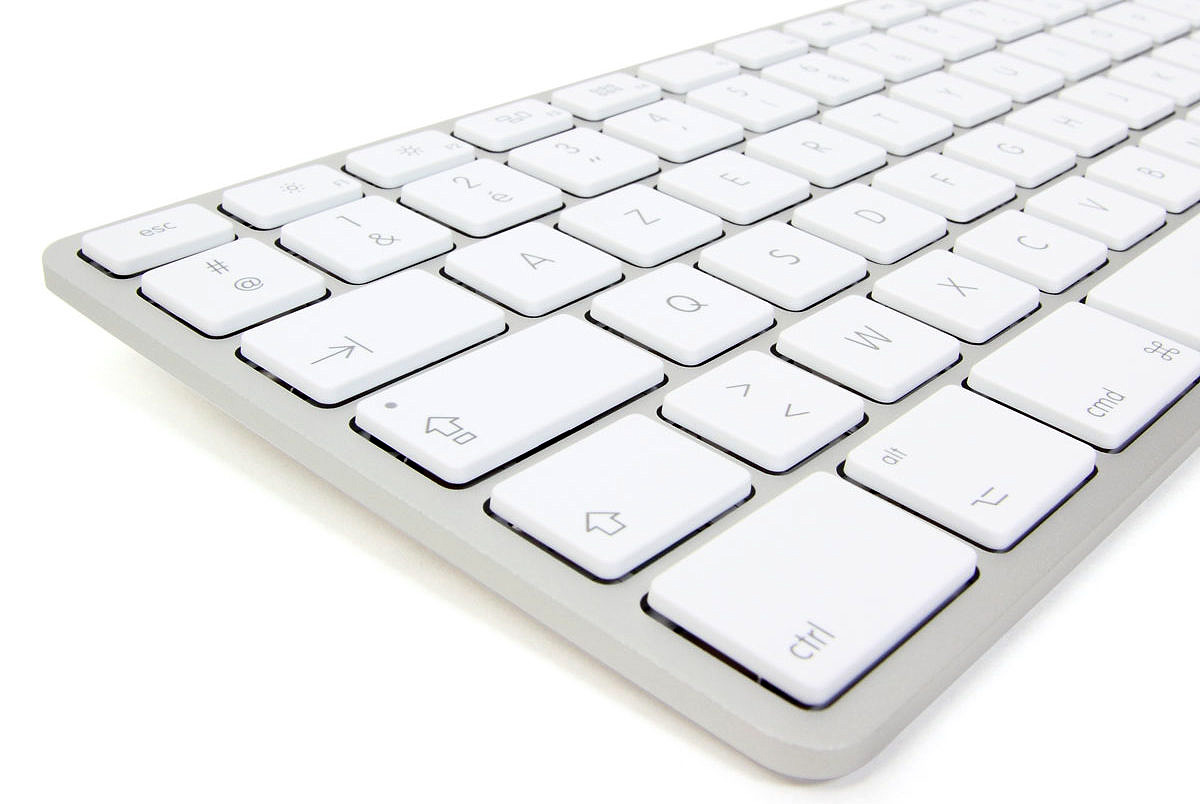
Here is version 1.4 (Windows) of my Unicode Syriac AZERTY keyboard. The Mac version is available here
Installation
- Click on the following link to download the keyboard: Syriaque avec clavier français 1.4
- Run the downloaded file, and wait during installation.
- A message informs you that the keyboard has been installed. Restart your computer.
Usage
- In your word processor, place the cursor where you want to input text with this keyboard.
- Click on the taskbar language “FR” siglum:

- Click on “SY Syria.”
- If you have several Syriac keyboards installed, click on the keyboard icon beside the “SY” siglum and choose:
- You can now input text using this keyboard. Don’t forget to use a good Unicode font such as Meltho.
- Once you’re done using this keyboard, click on the taskbar “SY” siglum again and choose “FR.”
Functions
Vowels
Vowels are located on the corresponding keys of a French keyboard:
- pthoḥo suscrit : touche a ; souscrit : MAJ+a ; pthaḥa : ALTGR+a ; zqapha : ALTGR+MAJ+a
- zqopho suscrit : touche o ; souscrit : MAJ+o ; rwaḥa : ALTGR+o
- rvoso suscrit : touche e ; souscrit : MAJ+e ; zlama pšiqa : ALTGR+e ; zlama qašya : ALTGR+MAJ+e
- ḥvoṣo suscrit : touche i ; souscrit : MAJ+i ; hvaṣa / ʿṣaṣa : ALTGR+i (ou ALTGR+u)
- ʿṣoṣo suscrit : touche u ; souscrit : MAJ+u ; hvaṣa / ʿṣaṣa : ALTGR+u (ou ALTGR+i)
Consonants
The alphabet and other common characters are located on the same keys as a regular French keyboard.
- ܐ : touche ² ou f ; ܐ suscrit : ALTGR+² ou ALTGR+f
- ܒ : touche b
- ܓ : touche g ; ܔ : MAJ+g
- ܕ : touche d ; ܖ : MAJ+d (ou MAJ+r)
- ܗ : touche h
- ܘ : touche w
- ܙ : touche z
- ܚ ; MAJ+h
- ܛ : MAJ+t ; ܜ : ALTGR+MAJ+t
- ܝ : touche y ; ܞ : MAJ+y
- ܟ : touche k
- ܠ : touche l
- ܡ : touche m
- ܢ : touche n
- ܣ : touche s ; ܤ : ALTGR+s
- ܥ : touche c ou MAJ+² ou MAJ+f
- ܦ : touche p ; ܧ : MAJ+p
- ܨ : touche x
- ܩ : touche q
- ܪ : touche r ; ܖ : MAJ+r (ou MAJ+d)
- ܫ : MAJ+s
- ܬ : touche t
Diacritical marks
- Féminin avec suffixe ܬ : ALTGR+t
- Rukkokho : touche $
- Quššoyo : MAJ+$
- Point souscrit : touche * ; suscrit : MAJ+*
- Rond souscrit : ALTGR+$ ; suscrit : ALTGR+MAJ+$
- Trémas souscrits : touche ^ ; suscrits : MAJ+^
- Deux points souscrits : ALTGR+^ ; suscrits : ALTGR+MAJ+^
- Trois points souscrits : ALTGR+* ; suscrits : ALTGR+MAJ+*
- Oblique suscrit : touche é ; souscrit : touche è
- Macron suscrit : touche – ; souscrit : touche _
- Circonflexe souscrit : ALTGR+ç
- Tilde souscrit : ALTGR+é ; suscrit : ALTGR+MAJ+é
- Brève souscrite : ALTGR+ù
- Musique suscrit : touche à
- Barrekh : ALTGR+MAJ+ù
- Abréviation : MAJ+: (à taper avant les lettres)
Punctuation
- Fin de paragraphe : MAJ+!
- Point infralinéaire : ALTGR+!; supralinéaire : ALTGR+MAJ+!
- Deux points infralinéaires : ALTGR+: ; supralinéaire : ALTGR+MAJ+:
- Deux points horizontaux : ALTGR+MAJ+;
- Deux points obliques gauche : ALTGR+;
- Deux points obliques droite : touche ;
- Deux points obliques infralinéaires : ALTGR+, ; supralinéaires : ALTGR+MAJ+,
- Contraction : ALTGR+-
- Obèle harkléen : ALTGR+MAJ+-
- Métobèle harkléen : touche ù
- Astérisque harkléen : MAJ+ù
Symbols
- Croix syriaque occidentale : ALTGR+& ; orientale : ALTGR+MAJ+&
- _ : ALTGR+_
- 〈 〉 : ALTGR+< et ALTGR+MAJ+<
- ⌈ ⌉ : ALTGR+MAJ+( et ALTGR+MAJ+)
- ⌊ ⌋ : ALTGR+MAJ+à et ALTGR+MAJ+ç
Control characters
- Liant sans chasse : ALTGR+j (utilisé pour forcer une ligature)
- Antiliant sans chasse : ALTGR+MAJ+j (utilisé pour empêcher une ligature)
- Ecriture de droite à gauche : ALTGR+b ; de gauche à droite : ALTGR+MAJ+b
Foreign characters
Persian consonants
- ܒ perse (ܭ) : MAJ+b
- ܓ perse (ܮ) : ALTGR+g
- ܕ perse (ܯ) : ALTGR+d
Sogdian consonants
- ܙ sogdien (ݍ) : ALTGR+z
- ܟ sogdien (ݎ) : ALTGR+k
- ܦ sogdien (ݏ) : ALTGR+p
Arabic characters
- Virgule : touche ,
- Point d’interrogation : MAJ+,
- Point virgule : touche ç
- Tatweel (joint) : touche j
- Hamza : ALTGR+MAJ+² ou ALTGR+MAJ+f
If you have any suggestions to improve this keyboard, just let me know!
Je suis en train de traduire en français la grammaire de Thackston pour une amie. Alors j’ai besoin de taper des lettres syriaques sous leurs trois formes: initiale, médiane et finale. Pour le moment je n’arrive pas à faire cela avec votre pilote de clavier Mac 1.4. J’ai essayé les caractères de contrôle, mais sans résultat.
J’utilise Mellel comme logiciel de traitement de texte.
Y a-t-il une solution?
Il faut utiliser le liant sans chasse (ALTGR+j). Concrètement, lancez Mellel et choisissez une police qui distingue plusieurs formes (par exemple Serto Jerusalem et la lettre n):
– Si vous tapez la lettre seule, vous obtenez la forme isolée.
– Si vous la faites précéder de ALT+j vous obtenez la forme finale.
– Si au contraire vous la faites suivre de ALT+j vous obtenez la forme initiale.
– Si vous la faites précéder et suivre de ALT+j vous obtenez la forme médiale.
Reconnaissance pour votre beau travail et merci de le partager. Concernant la police Meltho unicode que vous conseillez pour le syriaque, votre lien débouche sur une page inexistante à ce jour. Auriez vous une indication qui me permette d’obtenir cette police ?
Merci ! J’ai mis à jour le lien 😉