 En
En Fr
Fr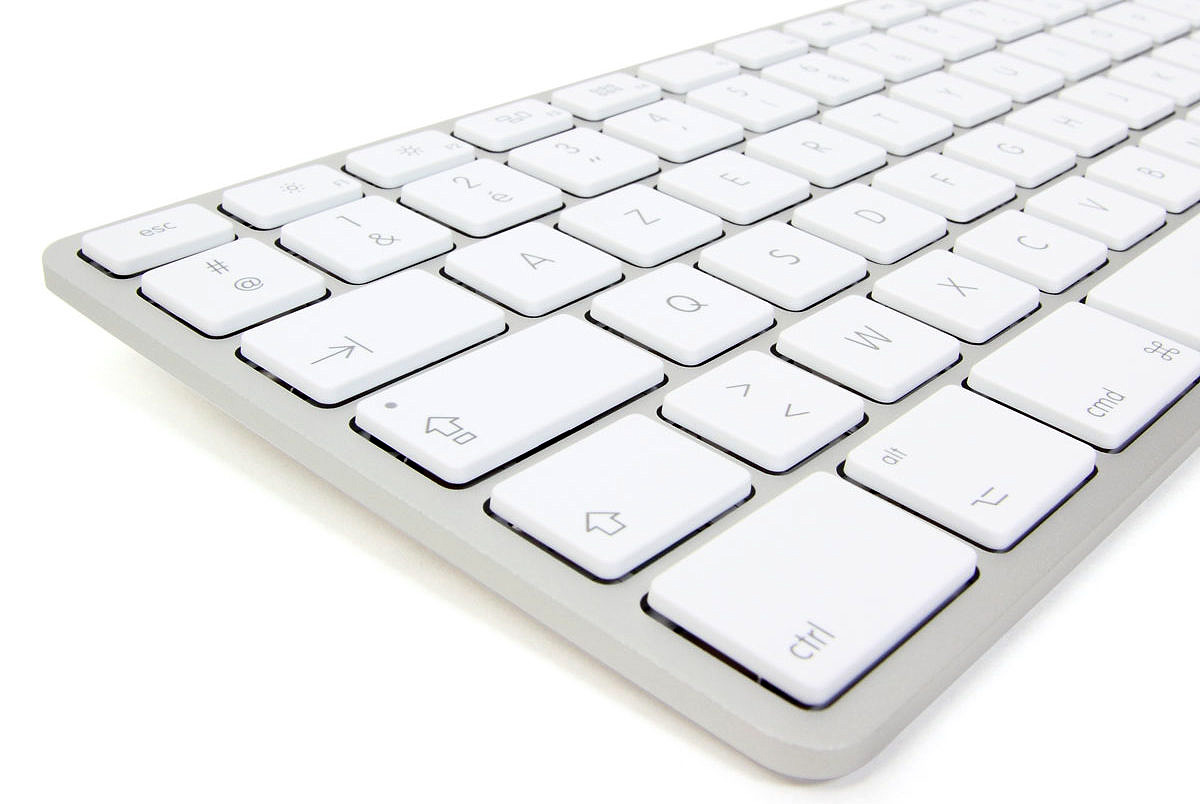
————
Update: new version here
————
Here is version 1.1a (Mac) of my Unicode keyboard “French with diacritics.” The Windows version (1.1) is available here.
Installation
- Click on the following link to download the keyboard: Français diacrité 1.1a Mac.
- Open the archive and put its files in your Library/Keyboard Layouts folder, and restart your session.
- In the menus bar, click on apple > System Preferences > Language & Text > Input Sources, and check “Français diacrité” (I advise you to check “Display Input menu in menu bar” too).
Usage
- In your word processor (e.g. TextEdit), place the cursor where you want to input text with this keyboard.
- Click on the menubar language icon, and choose “Français diacrité”
- Once you’re done using this keyboard, click on the menubar language icon and choose “French.”
Functions
Alphabet
The alphabet and other common characters are located on the same keys as a regular French keyboard.
Diacritics
Diacritics work in the same way as the circumflex accent on the French keyboard: type the accent, then the character that will receive it. Numerous diacritics are available; they are placed in a mnemotechnical way on a French keyboard:
Diacritics above
- circonflexe : touche ^ (ex: “^ i” → î)
- tréma : touche MAJ+^ (ex: “MAJ+^ i” → ï)
- aigu : touche é (ex: “é i” → í)
- grave : touche è (ex: “è i” → ì)
- macron : touche à (ex: “à i” → ī)
- brève : touche ù (ex: “ù i” → ĭ)
- tilde : touche ALT+é (ex: “ALT+é i” → ĩ)
- crochet : touche ALT+è (ex: “ALT+è i” → ỉ)
- caron : touche ALT+^ (ex: “ALT+^ i” → ǐ)
- rond : touche ALT+MAJ+@ (ex: “ALT+MAJ+@ a” → å)
- point : touche ALT+MAJ+; (ex: “ALT+MAJ+; t” → ṫ)
Diacritics below
- cédille : touche ç (ex: “ç t” → ţ)
- circonflexe souscrit : touche ALT+ç (ex: “ALT+ç t” → ṱ)
- brève (lunule) : touche ALT+ù (ex: “ALT+ù h” → ḫ)
- rond : touche ALT+@ (ex: “ALT+@ a” → ḁ)
- virgule : touche ALT+, (ex: “ALT+, t” → ț)
- point : touche ALT+; (ex: “ALT+; t” → ṭ)
- macron : touche ALT+: (ex: “ALT+: t” → ṯ)
Composite Characters
The Unicode system does feature all possible combinations.
Some fonts (notably Charis SIL) overcome this problem by offering smart diacritics positioning even when existing combination is lacking. It suffices to type the letter followed by the desired diacritical mark (pressing the SPACE key to place it below the preceding letter).
I can then add another diacritical mark in the same way.
Such a feature requires the use of a “smart” font such as Charis SIL and a compatible software (which should not be a problem on a recent computer).
Other characters
The keyboard additionally offers numerous characters used for transcriptions, critical editions, and so on.
Phonetics
- demi-anneau à droite (aleph) : touche ` (→ ʾ)
- demi-anneau à gauche (ayin) : touche MAJ+` (→ ʿ)
- coup de glotte : touche ALT+` (→ ʔ)
- coup de glotte réfléchi : touche ALT+MAJ+` (→ ʕ)
- epsilon latin (≠ grec) : touche ALT+& (→ ɛ) [pour la majuscule, combiner avec la touche MAJ]
- æ : touche ALT+a [idem]
- ej : touche ALT+z (→ ʒ) [idem]
- shwa : touche ALT+e (→ ə) [idem]
- thorn : touche ALT+t (→ þ) [idem]
- yogh : touche ALT+y (→ ȝ) [idem]
- œ : touche ALT+i [idem]
- o ouvert : touche ALT+o (→ ɔ) [idem]
- esh : touche ALT+s (→ ʃ) [idem]
- ed : touche ALT+d (→ ð) [idem]
- gamma latin (≠ grec) : touche ALT+g (→ ɣ) [idem]
- h barré : touche ALT+h (→ ħ) [idem]
- l sanglé : touche ALT+l (→ ɬ)
- lej : touche ALT+MAJ+l (→ ɮ)
Subscripts
- chiffres : taper ALT+n puis le chiffre voulu (ex: “ALT+n MAJ+&” → ₁)
Superscripts
- chiffres : taper ALT+MAJ+n puis le chiffre voulu (ex: “ALT+MAJ+n MAJ+&” → ¹)
- coup de glotte : touche ALT+f (→ ˀ)
- coup de glotte réfléchi : touche ALT+MAJ+f (→ ˁ)
- r : touche ALT+r (→ ʳ)
- r culbuté : touche ALT+MAJ+r (→ ʴ)
- j : touche ALT+j (→ ʲ)
- h : touche ALT+k (→ ʰ)
- w : touche ALT+w (→ ʷ)
- y : touche ALT+MAJ+j (→ ʸ)
- h crosse : touche ALT+MAJ+k (→ ʱ)
Symbols
- Diamètre (≈ ensemble vide minuscule) : touche ALT+q (→ ⌀)
- Ensemble vide (≈ diamètre majuscule) : touche ALT+MAJ+q (→ ∅)
- Multiplication : touche ALT+MAJ+$ (→ ×)
- Tiret insécable : touche ALT+à (→ ‑)
- Point de coupure de mot : touche ALT+§ (→ ‧)
- Prime : touche ALT+MAJ+’ (→ ′)
- Seconde : touche ALT+MAJ+” (→ ″)
- Crochet ouvert gauche : touche ALT+< (→ 〈)
- Crochet ouvert droit : touche ALT+MAJ+< (→ 〉)
- Demi-crochet haut gauche : touche ALT+MAJ+§ (→ ⸢)
- Demi-crochet haut droit : touche ALT+MAJ+à (→ ⸣)
- Demi-crochet bas gauche : touche ALT+MAJ+è (→ ⸤)
- Demi-crochet bas droit : touche ALT+MAJ+ç (→ ⸥)
- Cercle en pointillé : touche ALT+MAJ+! (→ ◌)
Changelog
- 1.1a : correction d’un oubli (^ + s = ŝ)
- 1.1 : remplacement des plafonds (2308, 2309) et planchers (230A, 230B) par des demi-crochets (2E22, 2E23, 2E24, 2E25). Peu de polices gratuites contiennent ces caractères, signalons néanmoins Aegean, ou la police shareware Code2000.
If you have any suggestions to improve this keyboard, just let me know!
SEE ALSO
 Extended French AZERTY Keyboard 1.7 Mac
Extended AZERTY Keyboard 1.7 Windows
Arabic AZERTY Keyboard 1.2 Windows
Ethiopic AZERTY Keyboard 1.2 Windows
Ugaritic AZERTY Keyboard 1.05 Windows
French Keyboard with Diacritics 1.1 Mac
French Keyboard with Diacritics 1.1 Windows
Hebrew AZERTY Keyboard 1.3 Mac
Extended French AZERTY Keyboard 1.7 Mac
Extended AZERTY Keyboard 1.7 Windows
Arabic AZERTY Keyboard 1.2 Windows
Ethiopic AZERTY Keyboard 1.2 Windows
Ugaritic AZERTY Keyboard 1.05 Windows
French Keyboard with Diacritics 1.1 Mac
French Keyboard with Diacritics 1.1 Windows
Hebrew AZERTY Keyboard 1.3 Mac
C’est un clavier impressionnant de possibilités. Je suis arrivé sur ce site en cherchant un clavier français permettant d’entrer facilement les lettres utilisées en espéranto (ĉĝĥĵŝŭ et ĈĜĤĴŜÛ) tout en conservant la configuration française (il existe de nombreux keylayouts pour cela mais ils sont tous à base de claviers US). À l’usage, ce clavier est donc plus pratique, mais son défaut dans le cadre d’une utilisation spécifique (textes mêlant français et espéranto) est qu’il neutralise des touches fréquemment utilisées en français comme é ou ù, et qu’avec le blocage majuscule enclenché, l’accentuation ne fonctionne pas (toujours pour les lettres spécifiques à l’espéranto). L’idéal pour ce cas de figure bien spécifique serait un clavier français qui “sacrifierait” les caractères peu usités correspondant à la combinaison alt + lettre (alt + c, alt + g, etc.) et alt + maj + lettre en les remplaçant par le caractère accentué voulu. Hélas, je ne trouve pas de keylayout français de base à modifier et je doute par ailleurs de mes capacités à mener à bien cette modification. Est-ce qu’un lecteur de ce blog pourrait m’aider?
Bonjour,
J’utilise depuis quelques jours votre clavier pour écrire les lettres accentuées de l’espéranto et c’est un vrai bonheur.
Il n’y a que les explications d’installation qui sont un peu erroné (peut être valable sur une ancien version du MacOS).
Pour l’activer, il faut aller dans Préférences système > Langues et textes > méthodes de saisie.
Encore merci pour ce que vous faites.
Axel
Effectivement les menus ont changé sous MacOS 10.6, je mets à jour la notice ! 😉
Bonjour,
J’essaie de télécharger le français diacrité pour les caractères de l’espéranto, mais je suis bloquée à la méthode de saisie. Pouvez-vous m’aider ? merci d’avance
Je ne suis pas sûr de comprendre votre problème… Tout dépend du “blocage” dont il est question. Notez que l’intitulé des menus diffère depuis MacOS 10.6 (voir commentaires précédents). Si votre Mac est plus ancien (10.4 ou 10.5) il vous faut trouver les menus équivalents.
Bonjour & merci pour ce superbe clavier & pour vos explications.
Je ne connais que Gentium, Helvetica & à présent Charis, capable de prendre en charge tous les diacritiques.
Je mets en pages des livres, & j’aurai aimé savoir s’il existe d’autre polices de ce genre.
Cordialement,
Bilal
Il n’y a pas beaucoup de polices, à vrai dire Helvetica et Gentium sont elles-mêmes moins complètes que Charis. Il y a aussi Titus, là encore moins complète que Charis. Cela dit, même les polices “standard” telles que Times (sur Mac) ou Times New Roman (Microsoft) sont plus étoffées dans leurs dernières versions, et peuvent donc faire l’affaire si vous n’avez pas trop de diacritiques exotiques. Si vous éditez des livres, sachez que les maisons d’édition ont parfois leurs propres polices, mais elles ne sont pas utilisables gratuitement…
woha ca faisait un moment que je cherchais une manière rapide pour insérer certain caractères …
je suis passé par typinator qui résoud à peu près mon pb …
la c’est magique
merci infiniment ! je vais tester ca, j’espère que ca marche sous leopard !
sebastien
Bonjour l’alsacien.
Sur mon nouveau mac os x, mon fils m’a instalĺvotre diacrité (tient, j’ai oublié d’annuler) à la place de “ek” -ru- qui était sur mon PC, et qui marchait très bien.
Sur votre système il y a souvent des bugs surtout en entrant u suivi de ù qui foire et que l’on doit reprendre manuellement.
Merci tout de même pour vos efforts.
Je ne connais pas “ek-ru-” sur PC (et non Mac ?!) et ne puis donc vous aider à ce niveau. Je puis en revanche vous assurer qu’il n’y a aucun “bug” avec mon clavier sous MacOS X, je l’utilise au quotidien depuis des années, et de nombreux autres utilisateurs également… Si vous tapez la touche ù puis la touche u (dans cet ordre et non l’inverse : d’abord le diacritique, puis la lettre) vous obtenez ŭ, c’est à dire un u surmonté d’une brève. Peut-être n’est-ce pas le caractère recherché ? Si vous voulez un u avec accent grave à l’aide de mon clavier, il faut d’abord taper la touche è (qui correspond à l’accent grave) puis la touche u. Cela prend évidemment plus de temps qu’avec le clavier français standard, auquel mon clavier n’est nullement censé se substituer : en temps normal, je vous conseille d’utiliser le clavier français standard, et de basculer sur mon clavier uniquement lorsque vous entrez du texte diacrité. Pour passer d’un clavier à l’autre, vous pouvez utiliser la petite icône de votre barre de menu (à côté de la jauge de batterie et de l’heure), ou utiliser le raccourci clavier CMD+ESPACE. Pour plus d’informations sur l’emploi des claviers sous MacOS X, je vous renvoie au manuel d’utilisation de votre Mac. 😉
Ah, enfin un truc qui va améliorer mon quotidien ! Merci beaucoup, c’est très pratique pour taper du texte en Esperanto et ça fonctionne surtout très bien (sur Mac OS X 10.6.2). Je n’avais trouvé jusqu’à présent que des petites applications payantes pour assigner les consonnes accentuées à des raccourcis clavier. Mais là ça fonctionne très bien et c’est gratuit alors je dis bravo et merci (encore).
C’est vrai que si on doit alterner français/esperanto ça oblige soit à changer de clavier à chaque fois soit à taper sur 2 touches pour faire les lettres accentuées françaises, mais bon, la peine est minime, notamment grâce au raccourci clavier CMD+ESPACE.
Bonjour et compliment pour votre clavier;
néanmoins, étant depuis peu sur Mac, je ne comprends pas cette étape de l’installation
et je vous serai réconnaissant de me détailler en sachant que je suis sur Snow Leopard 10,6,7 :
“-2
Ouvrez l’archive et copiez ses fichiers dans votre dossier Bibliothèque/Keyboard Layouts, puis redémarrez votre session.”
Merci d’avance
Cldt
Davide PERRONE
Pour ouvrir l’archive, il suffit de double-cliquer dessus. Cela crée un dossier contenant les fichiers. Il faut ensuite ouvrir une autre fenêtre dans le Finder, cliquer sur votre dossier maison, puis Bibliothèque, puis Keyboard Layouts. Vous pouvez alors glisser les fichiers depuis le dossier de l’archive vers le dossier Keyboard Layouts. Il ne vous reste plus qu’à redémarrer votre session en cliquant sur le menu Apple puis Fermer la session.
Je vous remercie;
je ne sais pas ou trouver l’archive,
mais j’ai réussi à transferer les 2 fichers dans : Biblioteque_Keyboard Layouts,
ça revient au même ?
Si vous voyez les 2 fichiers c’est que l’archive a automatiquement été ouverte une fois téléchargée, donc pas de problème ! 😉
Bonjour !
Je sens que de nombreux graphites vont brûler des cierges…
http://forum.macbidouille.com/index.php?showtopic=158753
Merci à vous (et au Sgt Pepper qui nous a fait connaître votre clavier fabuleux…)
Merci! 🙂 Et vive MacBidouille! 😉
Je profite de l’opportunité de pouvoir communiquer avec vous. J’ai un petit problème avec le “diacrité”, que j’utilise pour avoir les caractères Espéranto sous MAC. Tout va bien sauf pour le ‘s’ minuscule. Je m’en sors en tapant ^s^t sous “diacrité” mais voici ce que j’obtiens : ̂ŝt d’ou nouvelle manipulation… Que se passe-t-il ? Comment remédier ?
D’avance merci. Pierre
Pour faire un s minuscule avec accent circonflexe, activez mon clavier diacrité, appuyez sur la touche ^ puis sur la touche s. Vous obtenez ŝ. Vous n’avez pas besoin d’appuyer sur la touche t.
Je rajoute un message pour dire que j’utilise l’Espéranto pour faire des traductions pour publication sur le site “savoir-sans-frontiere”, BD de Jean-Pierre PETIT, que j’ai pu réaliser par Photoshop Eléments pour des fichiers .TIFF. J’ai plusieurs albums en souffrance parce que j’ai changé d’ordinateur et ne retrouve pas les fonctionnalités de Photoshop. Je pose ma question un peu brutalement : puis-je m’en sortir sous GIMP, logiciel “ouvert” sous GNU (libres). Où trouver un manuel en français pour ce logiciel ?
Amicalement
Pierre
Je n’utilise pas Gimp, mais je pense qu’il possède les fonctionnalités que vous recherchez. Interrogez les forums de discussion consacrés à ce logiciel, je suis sûr que vous y trouverez des réponses à vos questions ! 😉
Merci et félicitations pour cette réponse rapide et pertinente. :-))
Bravo ! très utile !
Perdre les touches de caractères accentués habituelle ralentit un peu la frappe, cependant…
Bonjour
J’ai suivi pas à pas les instruction données, j’ai redémarré, je vois bien le clavier français diacrité Langlois dans mes préférences en “méthode de saisie”, je coche, et… rien… j’obtiens toujours ^s, ^c etc…
je suis sous Mac OSX 10.6.8
Ai-je raté quelquechose?
Après l’avoir installé et ajouté aux claviers actifs, il faut le sélectionner en cliquant sur l’icône de langue (si celle-ci est visible) ou en utilisant le raccourci CMD+ESPACE (maintenez les deux touches enfoncées pour afficher à l’écran la liste des claviers actifs). Ensuite, faites un test simple dans n’importe quel logiciel (TextEdit, Safari, Word…): tapez la touche é, qui ne vous donne que l’accent aigu (sans le e), puis la touche i, pour obtenir í (= i avec accent aigu). Si cela fonctionne, le clavier est bien activé! 😉
Merci de cette prompte réponse, et aussi pour cet excellent clavier. Bravo.
Bonjour,
je suis néophyte sur Mac et j’ai quelques soucis pour télécharger votre programme, malgré les conseils déjà données.
Lorsque je télécharge le dossier, il apparait dans “téléchargements” j’ouvre le dossier et j’y trouve deux images bleu-blanc-rouge “Français diacrité” et “Français diacrité.keylayout”.
Ensuite je ne sais quoi faire, car les instructions donné plus haut ne correspondent pas.
Pour info, j’utilise la version Mac OS X 10.7.3.
Merci d’avance pour votre patience pour répondre à un débutant chez Mac.
Bonjour, les instructions sont pourtant correctes : vous devez copier les fichiers dans le dossier “Keyboard Layouts” de votre dossier “Bibliothèque”, puis ouvrir les Préférences système pour activer votre clavier. Si vous avez du mal, je vous conseille de vous faire aider par un informaticien.
Enfin une solution stable et fiable pour rédiger et échanger des textes berbères et en arabe algérien dans tous les logiciels de traitement de texte et de publication, après des années de gymnastique et de contorsions intellectuelles. Vraiment merci infiniment.
Yaɛṭik eṣṣaḥa ya ččix ! Sellektna ! Tanemirt-ik ay Agellid n tutlayin ! Tufiḍ lḥal i gerrzen di tira n tamaziɣt !
Saluton,
Dankegon al vi pro tiu utilega rimedo. Senprobleme mi instalis vian programon kaj ĝi bone funkcias. Jen la provo, mi skribas esperante per la ĵus instalita programo!
J’ai utilisé ma deuxième langue, l’espéranto dans ce commentaire pour attester que votre programme fonctionne très bien pour taper les lettres spécifiques de la langue espéranto et de plus il est facile de revenir au clavier français. Merci pour à vous.
Bonjour,
utiliser votre clavier était un véritable bonheur. Etait, parceque le nouveau logiciel d’exploitation “El Capitan” n’a pas le moyen de lire le fichier. Je l’avais tout d’abord téléchargé depuis votre site. Puis pour le deuxième essai, je l’ai recopié depuis le disque de sauvegarde, avec le même insuccès.
Bien cordialement,
AC
Bonjour, je n’ai pas testé El Capitan mais il est possible que le dossier “Bibliothèque” y soit à nouveau masqué (voir les commentaires sur les versions précédentes). Je mettrai à jour le cas échéant lorsque j’aurai installé El Capitan. 😉
Bonjour, je viens de découvrir votre site. Merci beaucoup pour ce travail! Je rencontre une difficulté pour obtenir un point suscrit sur la lettre “V” malgré pourtant le fait que je puisse facilement obtenir un point suscrit sur d’autres lettre, grâce à votre “clavier diacrité”, comme par exemple ” ṫ “.
Pourriez-vous m’indiquer, si cela est possible, comment obtenir un point suscrit sur un “V” au lieu d’avoir ceci: ” ̇V “.
En vous remerciant par avance.
Pierre-Yves
Comme pour n’importe quel autre diacritique, il faut commencer par saisir la lettre V puis saisir la combinaison, en l’occurrence MAJ+ALT+; suivi d’un espace. Ça donne : V̇ 😉
Soyez vivement remercié pour votre clavier très utile et pratique !
bonjour,
je suis bloquée à l’étape 2 de l’installation, qu’entendez-vous par ‘bibliothèque/keyboard’?
merci beaucoup!
Le dossier “Bibliothèque” est un sous-dossier de votre dossier personnel. Il contient lui-même un sous-dossier “Keyboard Layouts”. Vous pouvez accéder directement à ce dossier en ouvrant le Finder puis en tapant MAJ+CMD+G (ou en allant dans le menu “Aller” > “Aller au dossier…”). Une fenêtre s’ouvre et vous demande le dossier ; tapez “~/Library/Keyboard Layouts/” (sans les guillemets) puis cliquez sur le bouton “Aller”. Vous voici dans le bon dossier, c’est là qu’il faut copier les fichiers. 😉
Bonjour Michael Langlois,
Merci pour cette police et vos explications, mais il est vrai qu’elles ne sont plus adaptées aux versions récentes. J’étais sur Mac OS 10.6 (Léopard des neiges) depuis 2010. Je peux donc écrire parfaitement en espéranto depuis cette date. Super.
Je viens de passer à la version 10.10 (Yosémite). Et voilà ce qu’il faut faire: c’est valable pour les nuls comme moi.;-)
1) en haut dans la barre de menus commençant par Finder, Édition, etc, cliquer sur “Aller”
2) dans le menu déroulant qui fait suite à ce clic, cliquer sur “Aller au dossier”
3) une fenêtre s’ouvre alors, et coller ça: ~/Library/Keyboard Layouts/ puis cliquer sur “Aller” (surbrillance bleue).
4) Il apparaît alors une grande fenêtre Keyboard Layouts, et c’est là qu’il faut coller les deux fichiers Français diacrité et Français diacrité.keylayout
5) pour ce faire, copier tour à tour chacun des deux fichiers (en tapant sur le clavier cmd + C) et aller le coller dans la grande fenêtre Keyboard Layouts.
6) redémarrer l’ordinateur.
7) cliquer sur pomme > Préférences Système > Langue et région > Préférences clavier> Méthodes de saisie.
8) (en bas à gauche) cliquer sur +
Une autre fenêtre baptisée Clavier s’ouvre.
9) Dans la partie à gauche, faire descendre le curseur tout en bas et cliquer sur “Autres”: le fichier Français diacrité Michael Langlois apparaît
10) le sélectionner et cliquer sur “Ajouter.” Il se déplace alors dans la partie de gauche.
Vous fermez cette fenêtre, tout est fait.
11) dans la barre de menus en haut à droite un drapeau français apparaît. Cliquer dessus, la police “Français diacrité” apparaît. La sélectionner: vous pouvez ensuite taper vos lettres en espéranto selon la méthode expliquée par Michael Langlois.
Pour repasser au français penser à sélectionner sa police. Et ainsi de suite
Pour Michael Langlois: vous devriez laisser vos explications mais en précisant qu’elles conviennent à la version 10.6. Ce que je viens de préciser ici concerne la version 10.10. Pour les autres versions, je n’en sais rien.
Bien à vous.
Thierry Saladin
Merci mais, comme indiqué en tête de ce billet, il y a une nouvelle version du clavier et, comme vous pourrez le constater, les instructions sont à jour. 😉